SI Tickets
- 3.3
- Rating
- 50.00K
- Installs
- Free
- Price

 Analysis by App-foxy
Getting back to a live event often sounds simple: find the event, choose tickets, and make sure everything is ready before leaving home. In practice, the experience can become surprisingly dependent on your phone, your connection, and your timing. SI Tickets, an event app from SI Tickets by Sports Illustrated, is built around that modern ticket-buying routine. I found it most useful as a focused way to handle event discovery and ticket access from a mobile device, rather than as a complete event-planning companion.
The app is free and aimed at everyone, which makes it easy to consider whether you are buying your first digital ticket or simply want a dedicated place for event purchases. It belongs in the events category, and its current version is 4.00. The app was released on June 7, 2021, and supports Android 8.0 or later. Those details matter because an older phone may still be compatible, while the quality of the actual experience depends much more on your connection and how prepared you are before arriving at the venue.
How SI Tickets feels when your connection is part of the experience
I’d treat the connection as part of the event-day plan, not just a technical detail: checking the ticket while you still have time gives you room to respond calmly if a screen is slow or a network changes. In this section, I focus on practical ways to avoid rushed retries and awkward handoffs, so you can arrive knowing which phone and account are meant to handle the ticket.
You May Also Like

 Blood Strike: 2.5 Anniversary
Blood Strike’s Loadouts Turn Every Drop Into a Tactical Gamble
A close look at Blood Strike’s custom loadouts: how fast access to signature weapons reshapes its battle royale rhythm, rewards preparation, and narrows the gap between fights.

 Pandora - Music & Podcasts
Pandora’s Music Is Easy to Start, but Harder to Recover
Pandora’s strength is its low-effort path from a seed to a station. Its weak spot is how much confidence it asks you to place in connection, setup, and quiet recovery.

 8 Ball Pool
 Is Built on Rivalries, Rematches, and Routine
A close look at the rivalries, rematches, shared routines, and unanswered safety questions that turn a quick pool match into a persistent mobile community.

 Samsung Music
’s Quiet Strength Is Playing What You Already Own
Its reach comes less from spectacle than from dependable access to a personal library. That simplicity is both the app’s strongest retention engine and its ceiling.

 AccuWeather: Weather Radar
AccuWeather Review: A Quick, Clear Forecast for Everyday Decisions
For everyday plans, the best forecast is the one you can understand quickly. AccuWeather makes rain timing, radar, and local conditions easy to act on, with a few trade-offs.

 Hill Climb Racing
Why Hill Climb Racing Still Turns Crashes Into One More Run
A tiny car, a bumpy hill and one more upgrade: Hill Climb Racing keeps resurfacing because its simple chaos makes every near-miss feel personal.
More From Our News Desk



Browsing is easiest when you have time and a stable network
My first recommendation is to use SI Tickets while you are somewhere with a dependable connection, not while walking toward a venue or standing in a crowded entrance. Ticket discovery is the kind of task that benefits from patience. You want enough time to inspect an event, consider the available choices, and complete the purchase without feeling pressured by a weak signal or a nearly empty battery.
This is especially important because event decisions are time-sensitive. A seat or ticket option that looks attractive may not remain available while you pause, switch networks, or restart the app. I would therefore treat the app as a tool for making the main decision before the event day. Waiting until the last moment turns a straightforward purchase into a connectivity gamble.
The app’s focused purpose is a strength here. It does not need to compete with a general travel app, a social network, or a broad entertainment platform for your attention. When I want to deal with tickets, a dedicated app feels more direct than searching through unrelated services. That simplicity is useful for someone who already knows what event they want to attend.
At the same time, the focused approach can feel limited if you expect extensive planning help. SI Tickets is not the place I would rely on for building a full evening around an event, comparing transport choices, or organizing every detail of a group outing. I would use it for the ticket task, then handle directions, messages, calendars, and venue research with the tools that are better suited to those jobs.
Mobile use is convenient, but the phone becomes part of the ticket
The clearest advantage is mobility. I can look for an event from a sofa, during a commute, or while coordinating plans with friends. A phone is usually closer at hand than a computer, and an events app makes sense when the decision is happening away from a desk. That convenience is valuable when plans change quickly and you need to act without opening a laptop.
There is a trade-off, though. A small screen is less comfortable for comparing several options than a larger display. If I am making a careful purchase, I prefer to slow down and review the details rather than tapping through quickly. The app works best when mobile convenience matters more than having the broadest possible view of the transaction.
A realistic example is a group deciding on a weekend event. One person can use SI Tickets to check the available choices while the others confirm schedules in a messaging app. Once everyone agrees, the buyer can finish the transaction from the phone. The practical tip is to avoid treating the app as a group chat or shared planning board; use it for the purchase, and keep the conversation somewhere designed for coordination.
Another useful habit is separating “finding an event” from “being ready to enter.” I would search and buy while connected to a reliable home or office network, then open the relevant ticket information again before leaving. That second check is not glamorous, but it reduces the chance of discovering an account, screen, or loading problem at the worst possible moment.
What happens when the network becomes unreliable
Connectivity matters most at the points where you have the least patience: loading event information, completing a purchase, or trying to display ticket details near an entrance. A slow connection can make it unclear whether a page is still working or whether an action has already gone through. That uncertainty is more stressful than a simple error message because repeating a purchase may create confusion.
My approach is to pause before tapping again if a transaction appears stuck. First, I check whether the screen changes, then I look for confirmation through the app or the relevant account area before attempting another action. This is a general safety habit, but it is particularly important with tickets because duplicate actions can be difficult to untangle in a crowded, time-sensitive situation.
I would also avoid switching repeatedly between mobile data and Wi-Fi during checkout. Moving between networks can interrupt a session at exactly the wrong time. If the current connection is usable, staying on it is usually less disruptive than chasing a stronger signal every few seconds. If it is clearly failing, I would stop, move to a better location, and begin again only after checking what has already happened.
For venue entry, I would not assume that a ticket screen will appear instantly just because it appeared earlier at home. Connectivity can change after you leave, and crowded places can make mobile services feel slower. Opening the app shortly before arrival, while the connection is still comfortable, is a sensible preparation step. I would also keep the phone charged and avoid closing the relevant screen unnecessarily once I am close to the entrance.
That advice is not a claim that the app provides an offline ticket mode. It is simply the way I would manage a network-dependent mobile ticketing experience: prepare early, verify what has completed, and avoid leaving the most important screen until the last second.
Recovery requires a calm, deliberate workflow
If something goes wrong, the first question is whether the problem concerns the network, the app session, or the transaction itself. These situations can look similar on a phone. A page that fails to load does not automatically mean a purchase failed, and a delayed confirmation does not automatically mean it is safe to start over.
I would recover in stages. I would wait briefly, check the connection, and reopen the relevant area only if I am confident that doing so will not repeat an unfinished action. If the app closes, I would relaunch it and look for evidence of the completed purchase before making another attempt. This is one of the less obvious lessons of digital ticketing: the best recovery step is often checking status, not immediately pressing the purchase button again.
When helping a friend use the app, I would make sure the person who bought the ticket remains available. Passing responsibility between several phones can create unnecessary confusion about which account contains the ticket or which device should display it. A simple plan—one buyer, one primary phone, and one backup communication channel—makes the event-day handoff easier.
There is also a difference between a failed purchase and a failed display. If the ticket was obtained successfully but the screen will not load at the entrance, the response should focus on restoring access to the account or connection rather than buying again. I would move away from the busiest part of the entrance, reconnect carefully, and ask venue staff for guidance if the problem continues. The app can simplify access, but it cannot remove every point of friction created by a phone, a network, or venue procedures.
Using the app without wasting mobile data
SI Tickets is not an app I would open constantly throughout the day. For a normal event workflow, I would use it in a few intentional sessions: browse when I am ready to decide, complete the purchase on a stable connection, and check the ticket before leaving. This approach is more comfortable than repeatedly refreshing while travelling and is also kinder to a limited mobile-data plan.
Wi-Fi is the obvious choice for browsing and purchasing when it is trustworthy. I would be more cautious with public networks, especially if the connection is unstable or requires repeated sign-ins. A secure, reliable connection is preferable to a free network that drops during checkout. If mobile data is my only practical option, I would disable unrelated activity on the phone where possible and avoid switching between apps while the transaction is underway.
Data-conscious use is not only about megabytes. It is also about reducing repeated loading and preventing avoidable retries. Searching with a clear event in mind, reviewing information once, and saving time for the final decision is more efficient than opening and closing the app while distracted. In my experience, good preparation improves both the network experience and the ticket experience.
For someone travelling internationally, I would be especially careful. Mobile access can be affected by roaming arrangements, local coverage, and account settings. I would complete as much as possible before travelling and confirm that the phone can connect when needed. I would not make the app the only part of a trip plan without thinking through how I will reach my ticket if the connection is poor.
Where it stands beside the usual alternatives
The usual alternative is a website opened in a mobile browser. A browser can be more convenient if you are already comparing several event sources or using a computer with a larger screen. It may also fit better into a workflow where you want to keep multiple tabs open. SI Tickets has the advantage of being a dedicated mobile destination, so it feels more natural when the phone is already the center of the purchase.
Another alternative is buying directly through a venue or event organizer’s own channel. That may be preferable when you want the closest connection to the event’s official information or when the organizer’s process is more familiar to you. I would choose SI Tickets when its event selection and ticket flow match what I need, but I would still compare the event details carefully rather than assuming every ticket source offers the same experience.
General ticket marketplaces can be useful for broad searches, resale comparisons, or collecting many event types in one place. Their wider scope may suit someone who is still deciding what to attend. SI Tickets is a better fit for a user who wants a more focused event-ticketing route and does not need a large planning ecosystem around it.
The trade-off is straightforward: specialization can reduce distraction, but it can also mean fewer reasons to stay inside the app after the ticket task is finished. I see that as a positive for people who want a clean purpose and a limitation for people who expect discovery, travel planning, social coordination, and ticket management in one package.
Who should use it, and who should choose something else
I would recommend SI Tickets to someone who prefers handling event purchases from a phone, already has a particular event in mind, and is comfortable preparing before the day of attendance. It is also a reasonable choice for people who dislike juggling a general marketplace with unrelated features. The free price removes a basic barrier to trying it, and the Everyone age rating makes it broadly approachable.
I would be more cautious about recommending it to someone with an unreliable phone, limited connectivity, or a strong preference for printed documents and desktop browsing. The app’s convenience depends on the phone being ready when the ticket is needed. If that dependence feels stressful, a different ticketing route with a process you already trust may be a better fit.
It may also be the wrong choice for a user who wants extensive event discovery and comparison across many services. In that case, a broader marketplace or browser-based search may offer a better starting point. SI Tickets makes more sense once the ticketing task is clear, not necessarily when you are exploring every possible option from scratch.
What the current audience suggests, and my practical verdict
The app has an average rating of 4.0 from around seventy-seven ratings, with roughly a dozen written reviews. That gives it a visible history of user feedback, although I would not treat the score alone as a guarantee that every event-day experience will be smooth. Ticketing depends on more than the app: the phone, the network, the event process, and the user’s preparation all matter.
It has passed ten thousand installs, which places it beyond a purely experimental download while still feeling more focused than the biggest mass-market platforms. SI Tickets by Sports Illustrated is the developer behind it, and the app’s identity is clearly centered on getting users back to live events through a mobile ticketing experience.
My strongest advice is to use the app early, confirm the purchase before travelling, and think about your connection before you reach the venue. Do not wait for a crowded entrance to discover whether the phone can load what you need. Do not repeat a transaction simply because a screen is slow. Those small decisions make a bigger difference than repeatedly refreshing.
Overall, I see SI Tickets as a practical, focused events app rather than an all-purpose event companion. Its real strength is the convenience of handling a ticket task from a phone, while its main weakness is that the same phone and network become part of the entry plan. If you prepare while connected and want a simple mobile route to live-event tickets, I think it is worth trying. If you need offline certainty, extensive planning tools, or a broad comparison marketplace, I would look at an alternative that better matches those priorities.
FAQs for SI Tickets
01What is SI Tickets and how does it work?
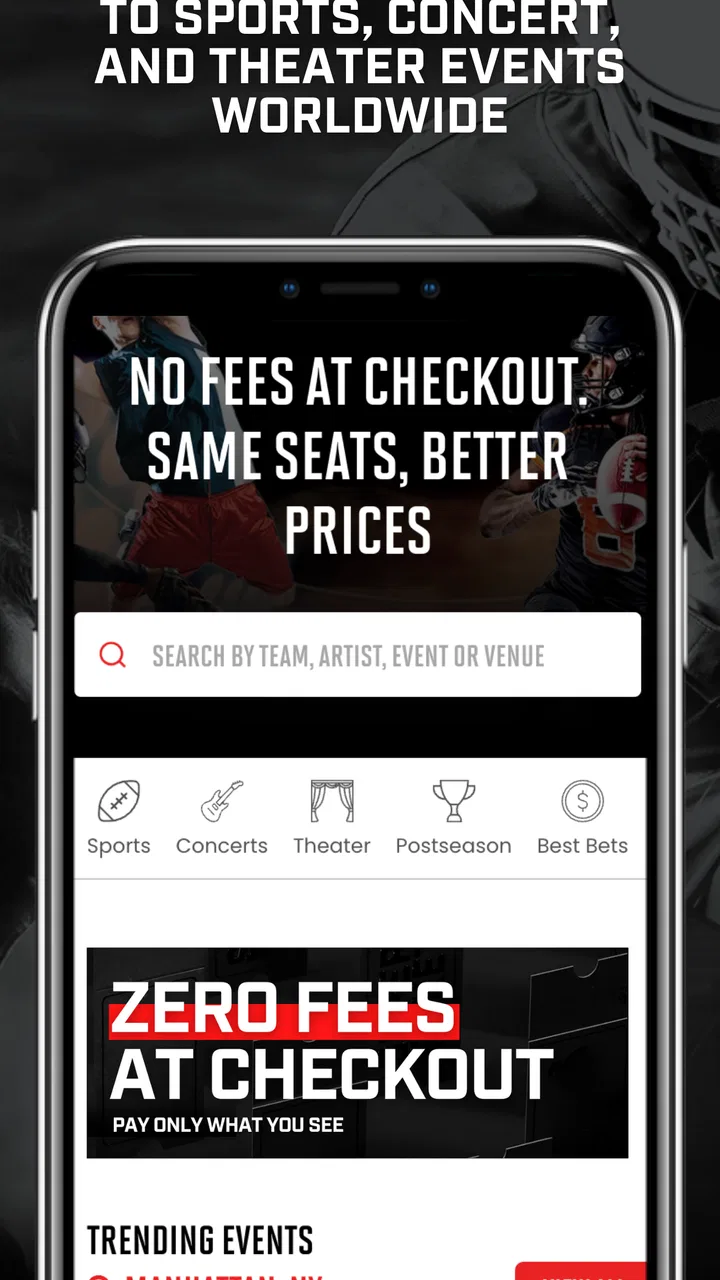
SI Tickets is a mobile application designed for purchasing tickets to various events, including sports, concerts, and theater. Users can easily browse events by category or location, compare prices, and make secure purchases directly through the app. It offers a user-friendly interface and real-time updates on ticket availability.
02Is SI Tickets available for both Android and iOS devices?
Yes, SI Tickets is available for download on both Android and iOS platforms. Users can find it on the Google Play Store for Android devices and the Apple App Store for iOS devices, ensuring a wide accessibility for all smartphone users.
03Are there any additional fees when purchasing tickets through SI Tickets?
While SI Tickets aims to provide competitive pricing, users should be aware that there may be additional service fees or taxes applied at checkout. These fees can vary depending on the event and venue. It’s recommended to review the total cost before completing any purchase.
04How does SI Tickets ensure the security of my transactions?
SI Tickets employs advanced encryption technologies and secure payment gateways to protect users' personal and financial information. The app is designed to ensure that all transactions are safe and secure, providing peace of mind for users during their purchase process.
05Can I get a refund if I can’t attend an event I purchased tickets for?
SI Tickets has a refund policy that varies based on the event and the seller’s terms. Generally, refunds are not guaranteed unless specified by the event organizer. It's important to review the refund policy for each ticket purchase and consider ticket insurance options if available.
Pros
- User-friendly interface with easy navigation
- Wide selection of events and concerts available
- Secure payment options for peace of mind
- Customizable alerts for favorite events
- Efficient customer support service
Cons
- Limited refund policy for canceled events
- Occasional app crashes during ticket purchase
- Service fees can increase total ticket cost
- Not all events have e-tickets available
- Requires constant internet connection

SI Tickets
Gallery